
KREWES CONTROL MANAGEMENT SOFTWARE GUIDE
  • Administration
  • Glossary
  1. Home
  2. Knowledge Base
  3. Administration
  4. Add Business Account
  1. Home
  2. Knowledge Base
  3. Business Accounts
  4. Add Business Account
Searching...

Add Business Account

Business Accounts are for the grouping and tracking of multiple user accounts that are managed by a company or organization. Business Accounts can have group statements for payment of multiple accounts. You can access these by:

On the left navigation under Accounts, click Business Accounts. This will take you here:
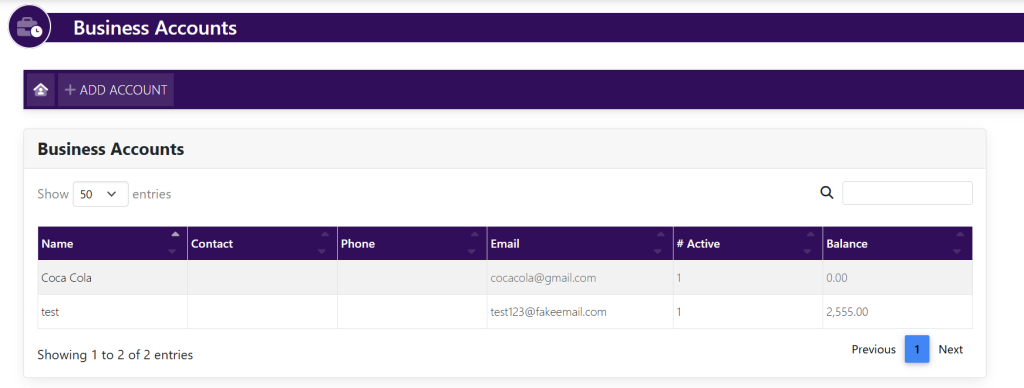
At the top section navigation, click ADD ACCOUNT. A new page will appear that looks like this:
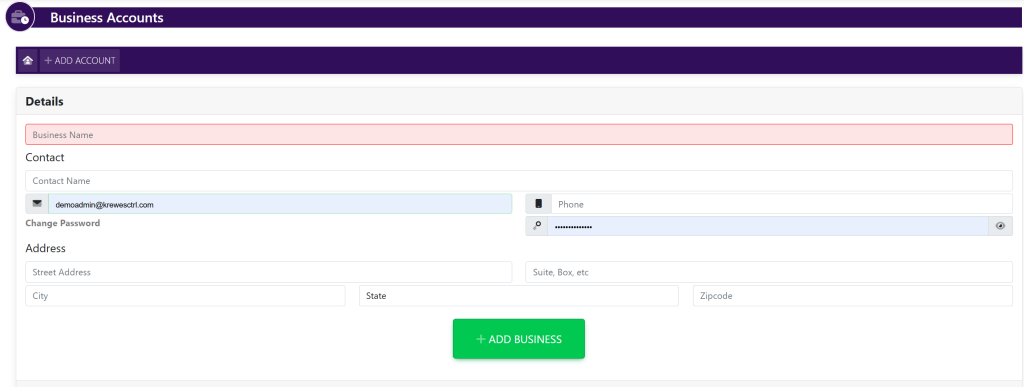
  • Enter the following fields
    • Business Name (required)
    • Contact Name
    • Contact Email (required)*
    • Phone
    • Street Address
    • Suite/
    • City
    • State
    • Zipcode

Select the green button titled +ADD BUSINESS

Updated on July 29, 2025
Tagged: business account

Related Articles

  • Delete Invoice
  • Edit Invoice
  • Edit Payment
  • Add Payment Type
  • Setting Up ACH For A KrewesCtrl User With GrowSimple
  • FAQ: Invoices Are Not Being Created When Event Orders Are Created
© Copyright BayouNorth.
  • Features
  • Blocks
  • FAQ