
KREWES CONTROL MANAGEMENT SOFTWARE GUIDE
  • Administration
  • Glossary
  1. Home
  2. Knowledge Base
  3. My Account
  4. Update Address
Searching...

Update Address

In the left side bar, select My Account. This will take you here:
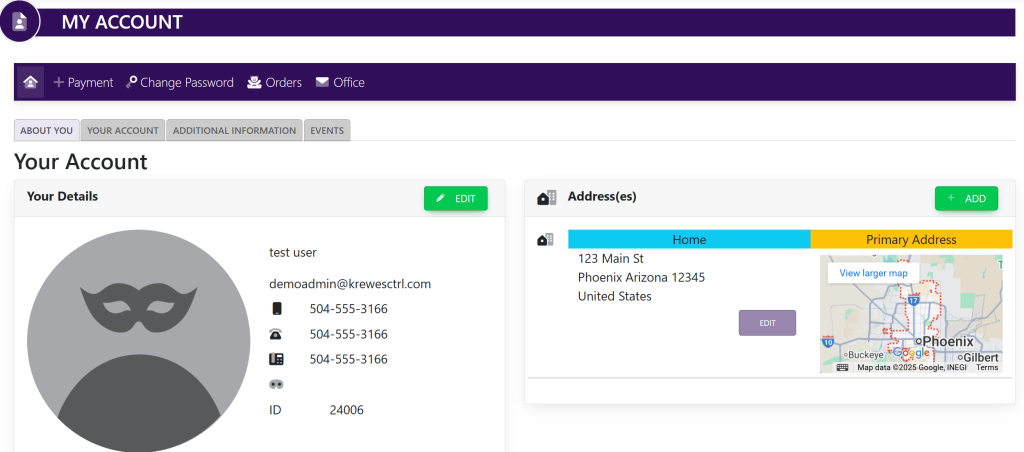
In the Address(es) box, select Edit next to the current address. A pop-up will appear that looks like this:
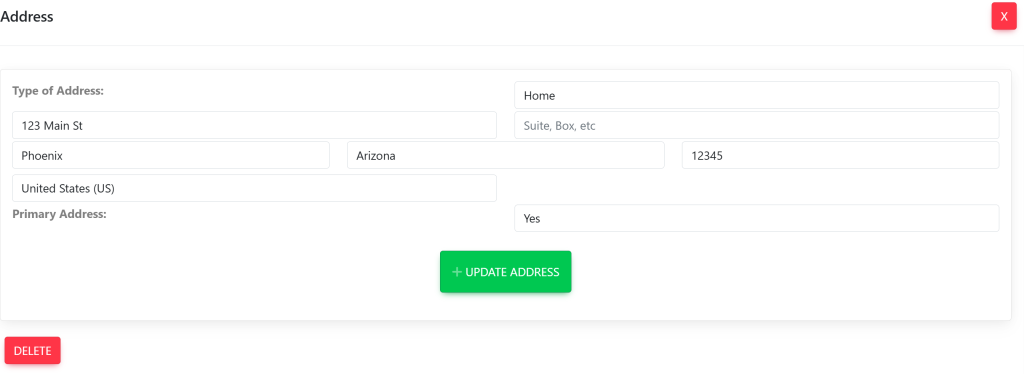
Type in the address that you wish to have on your profile.

Then, select the green button titled Update Address.

Updated on July 9, 2025
Tagged: AddressMy Account

Related Articles

  • Delete Invoice
  • Edit Invoice
  • Turn On/Off Admin Access To View All Messages Sent In System
  • Turn On/Off Content Displayed In Emails From The System
  • Turn On/Off New Message Notification Emails
  • Guest Ticket Set Up/ETail
© Copyright BayouNorth.
  • Features
  • Blocks
  • FAQ